
In this article:
Resources for taming Facebook’s tracking of activities outside of the app
Making ads more relevant and hiding the offensive, scammy, or stupid ones
Blocking ads and suggested posts completely on PC and Mac
If you missed the first two articles in this series on making your Facebook experience less horrible, check them out:
Make Your Facebook Feed Less Horrible — how to show posts from all your friends, without “suggested” crap in your feed
Taming Facebook: Favorites and Unfollows — create a feed with posts from your 30 favorite people/pages, and unfollow annoying folks without unfriending
Finally at the last entry in my “Facebook has gotten really shitty, but I’m staying around because friends, how can I make it tolerable?” trilogy. Can’t say I’m not anxious to move on to happier topics, but if I can help y’all snag back control of your communication with friends from the monetization fiends in Zuck’s empire, it’s worth the effort.
Facebook Tracks You Even When You’re Not Using It 🤮
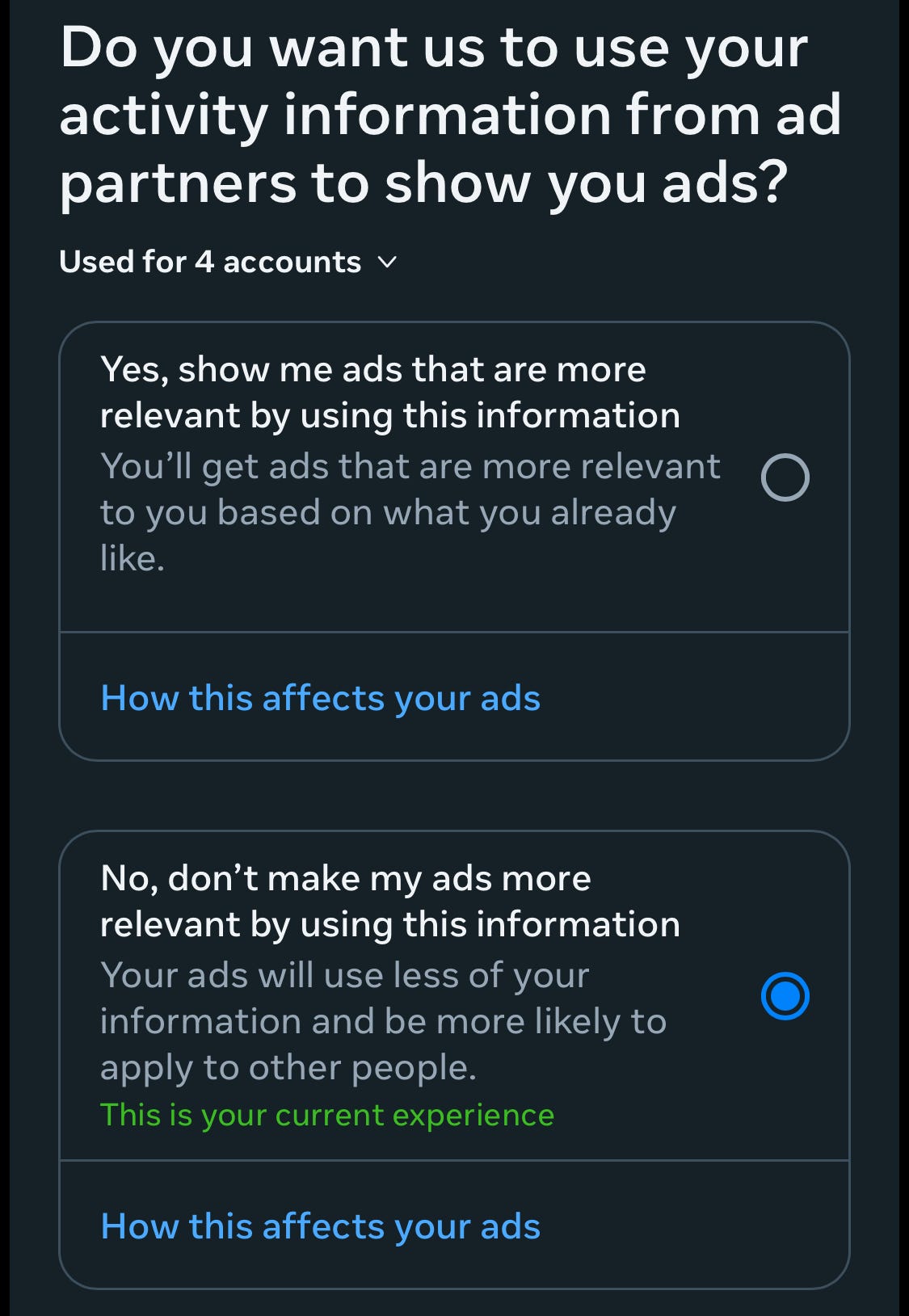
Facebook is free because they’re monetizing you, showing you ads and using your activities to sell more ads. (Except in Europe, where thanks to the EU government rules FB users can pay a monthly fee to enjoy an ad-free experience.) I’m actually okay with that contract in general. I’m using the service, and if I’m going to see ads, I’d rather they be relevant to my interests.
What I am not okay with is Facebook watching everything else I do on phone/PC to target those ads. And they do that by default. Which is akin to saying “You didn’t ask me not to root through your wallet.” Facebook tracks your activity in other apps and on other websites, and is also nosy on sites where you opted to “log in using Facebook” instead of setting up a user name/password combo.
The good news is that you can turn this off, so that Facebook’s insanely detailed profiling of you will at least just focus on what you do on FB itself. When you turn these settings off, the wordsmiths on Facebook’s talented content design will try to dissuade you by warning you that your ads may become irrelevant. That’s bullshit: I’ve had these settings disabled for a long time and I’m still getting ads for Star Trek, cat stuff, Star Trek cat stuff, and large winter beanies to fit my incredibly huge head. (Still trying to figure out why FB accurately knows my staggeringly large hat size.)
Turn off Meta’s External Tracking
Here’s the process for limiting how FB uses your info outside of their own service:
Open the Facebook app on your phone, or go to Facebook in your web browser, and open the Menu. (Bottom right corner on the app, top right corner on the website.)
Choose Settings & privacy, then choose Settings
Choose See more in Accounts Center
Select Your information and permission
Choose Your activity off Meta technologies. Choose Manage future activity and then Disconnect future activity to turn off tracking of what you do outside of the Facebook app. This will also clear your previous tracking history.
That’s it. You’ll be slightly less monetized, and Facebook will be rooting less through stuff it has no business looking at.
Mute Scammy and Crappy Ads.
And Ads That Make Fun of Your Butt Size
Most of the Facebook ads I get are actually things that are interesting to me: comedy shows, NASA and Star Trek clothes, toys that will entertain my cats for 1-6 minutes… But so many of the sellers are scammers at worst, profiteers at best. Generally if you do see something you want advertised on Facebook from anyone other than a known major company, a quick search on Google or Amazon will show you the same product for significantly less money. (Found a fun Pink Floyd-inspired cat t-shirt that was advertised on FB for $35 for under $20 on Amazon, from the original designer.)
If the Facebook ad does seem like a really good deal, remember what us Gen X’ers learned about caveat emptor from The Brady Bunch: buyer beware, because a deal that’s too good to be true probably is. Mike Brady was no fool.
Anyway, sometimes you get ads that not only don’t interest you, they’re just flat out annoying. Facebook somehow correctly determined I have a huge noggin and offered me ads for giant winter beanie hats. However, Facebook obviously does not have the technology to note that, while my buns won’t make a Kardashian lose sleep, I do have a butt, you jerks.
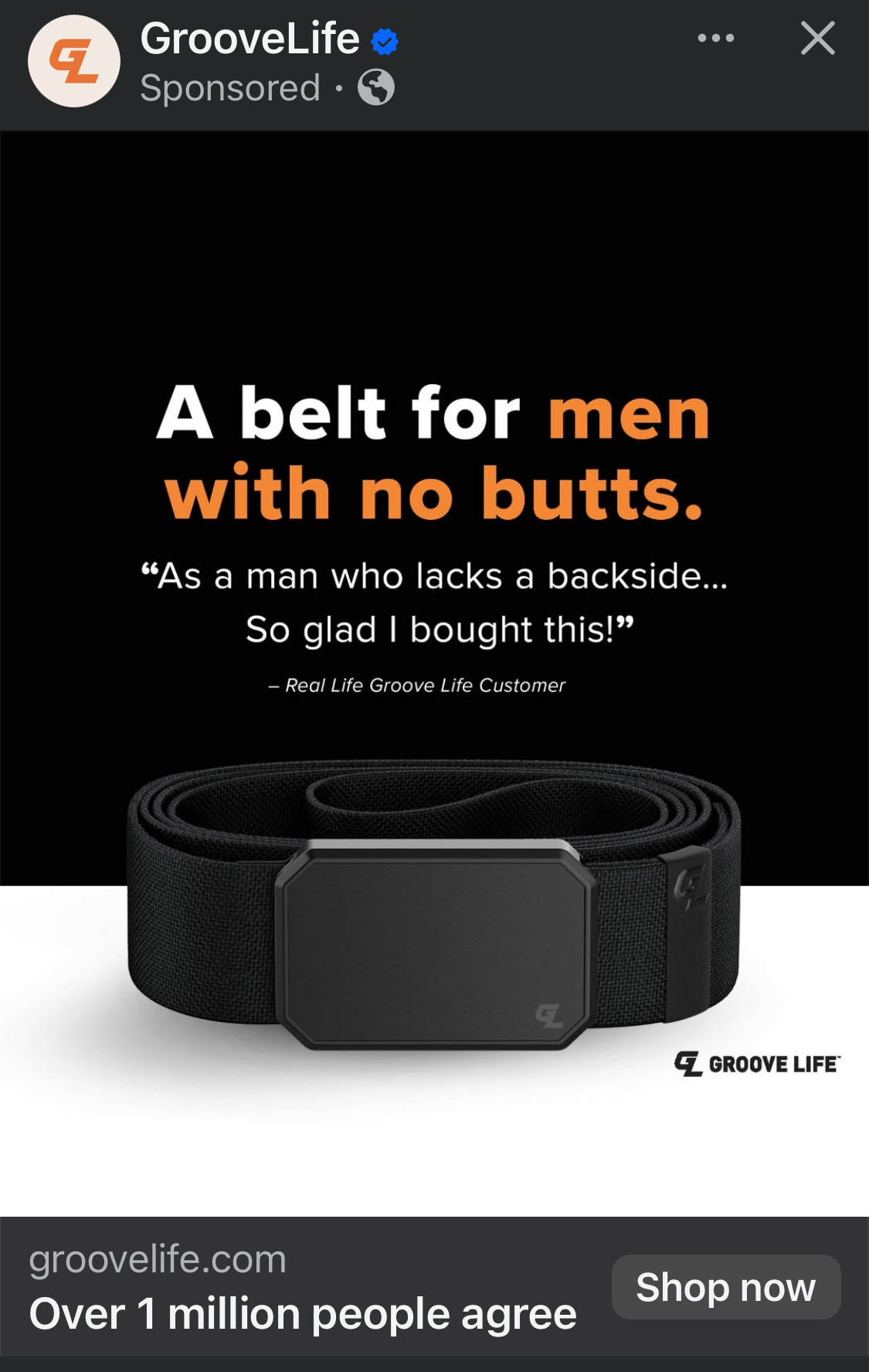
I can’t believe I essentially just gave these guys a free ad. Anyway, ensuring I never see it again is easy, at least.
Just click the … menu next to the advertiser’s name, and then choose Hide ad. You’ll never see this ad again.
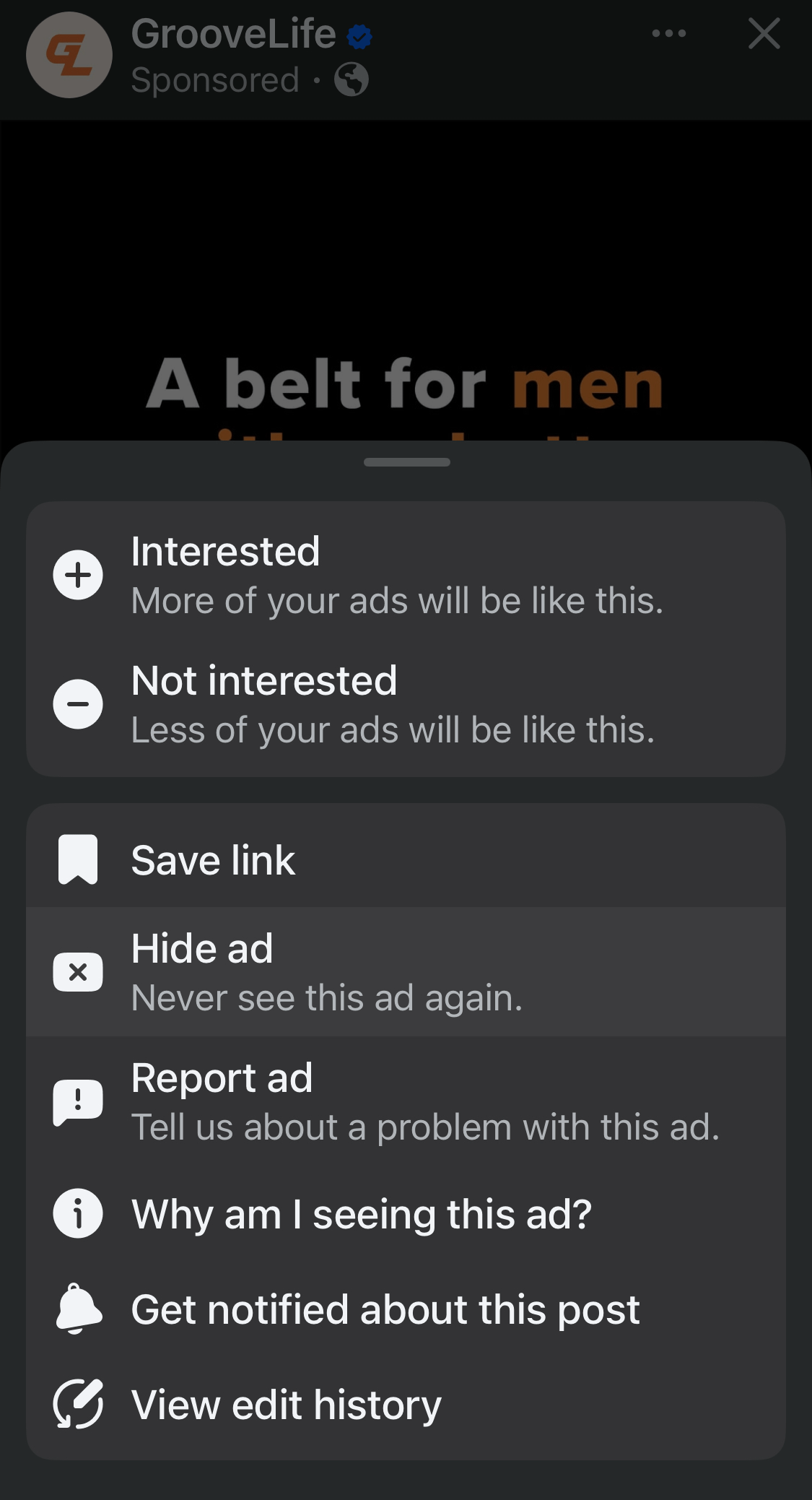
Of course, though FB will likely take your deciding to hide an ad into consideration during future sessions, there’s always the chance you’ll get a different ad from the same annoying advertiser later. To avoid that, select the name of the advertiser at the top of the post to go to the advertiser’s Facebook page, then click the … menu and choose Block to never see content from that company on FB again. Yeah, my ass is talking to you, GrooveLife.
Well, maybe GrooveLife just thinks I might want to buy these as gifts. Now I’m going to have to start looking at my guy friends’ butts to see if I should stock up on these next Christmas.
Cleaning Up Suggested Posts
Honestly, the best solution is to just use the Friends and Favorites feeds, where you won’t see Suggested Posts at all. But if you have reasons to use the main feed, you can at least stop the stupider pages and people from appearing more than once.
Just click the … menu next to the title on any post that’s marked with Follow, then select Hide all from (page name) to stop getting Suggested posts from them. Or select Block (page’s) profile if they’re particularly moronic and you never want to see them anywhere on Facebook.
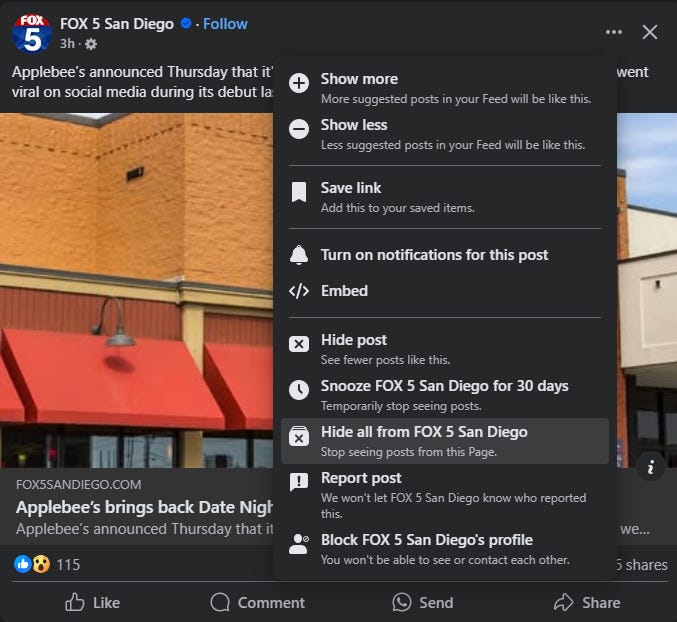
You can, of course, choose Show more or Show less to attempt to fine-tune the suggested post content. But that feels like you’re just encouraging this invasive feature, when it should be opt-in, or at the very minimum, something you can disable.
The Nuclear Option: Block It All with F.B. Purity
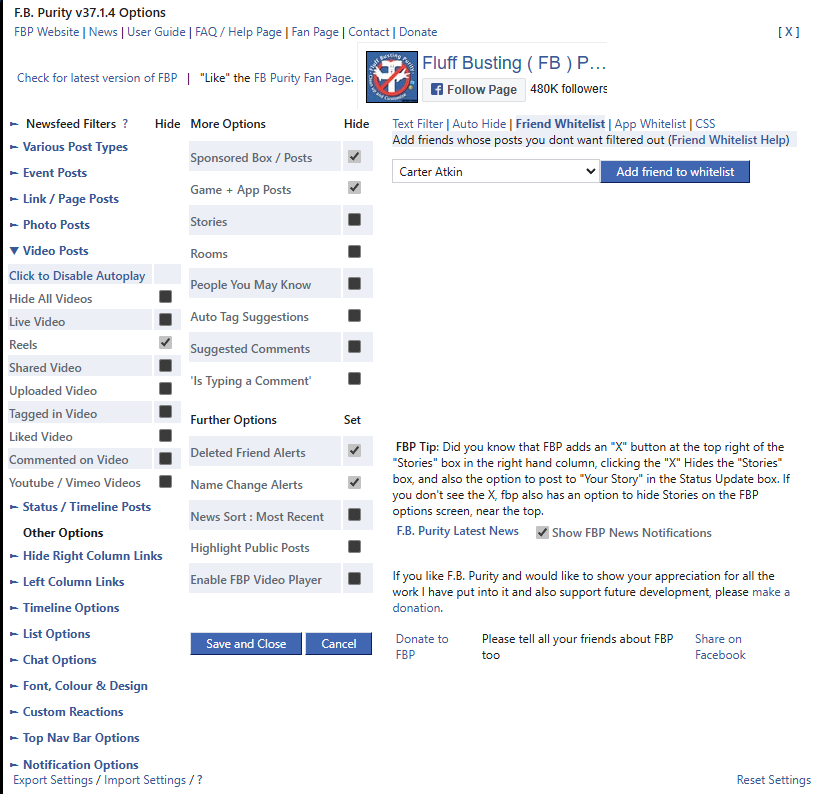
If you browse Facebook on your computer, the F.B. Purity extension can automatically block not just ads, but other garbage you didn’t ask for, such as suggested posts and Reels containing anything other than cute cat or dog videos.
It’s a plug-in for browsers like Google Chrome, Firefox, and Microsoft Edge, and it automatically filters your feed. Of course, browser plug-ins can carry security risks, but F.B. Purity has been around for years, is actively used by hundreds of thousands of people and hasn’t shown any risks or nefarious intentions — as far as I can tell, it’s just useful donationware. The only real “downside” is that you’re very likely violating Facebook’s terms of service (you’ve read those thoroughly, right?) by using it, and decreased ad revenue from all the people using the app might mean Zuck has a little less cash for doomsday art his underground bunker in Hawaii.
There are detailed instructions for installing it and configuring options on the F.B. Purity website. Just be warned: After using this, the Facebook experience will be so much better on your computer that you’ll be pissed when you have to go back the dumpster fire of the unfiltered feed on your phone or tablet.
Instagram’s Spying Too
Instagram also watches your Internet activity. Here’s how to turn it off:
Open Instagram on your phone and tap your profile picture at the bottom right.
Tap the menu (three horizontal lines) button in the top right corner.
Tap Accounts Center
Scroll down to the Account settings section, and tap Ad Preferences
Tap the Manage Info header, and check out each setting. Turn off Activity information from ad partners, Ads from ad partners, and Ads about Meta.
As mentioned, social media activity should never be thought of as private. Your activity is still tracked in detail with every privacy protection turned on. But making these adjustments will at least reduce Meta’s nosiness leaking into your other Internet activity, and vice versa.
That’s A Wrap for Now. Till New Suck Happens
The tips in these articles won’t stop Facebook from screwing with your feeds, but they can at least make them more tolerable.
Ironically, many of us would spend more time on Facebook—exactly what the company wants—if they’d just give us direct control over who and what we see. But after working in tech for a couple of decades, I don’t think this is a matter of them misunderstanding their users. It’s about how these companies function internally.
If you’re a Meta employee working on Facebook (or “the blue app,” as it’s called inside Meta), your success isn’t measured by user satisfaction. It’s judged by one thing: engagement. Your job is to ship features that drive measurable increases in usage metrics or ad revenue.
Making it easy to ignore scammy ads, unwanted features like Reels, and Suggested posts from people you’d cross the street to avoid would be the best thing Facebook could do for its long-term success. But that wouldn’t boost short-term engagement, which means a bunch of blue app product designers would risk getting laid off. So, expect Facebook to keep getting worse, not better, for those of us who just want to connect with friends and family.
But don’t despair. If the crap factor rises, watch this space—I’ll be here with tips and tricks to keep the suckage as low as possible.
Disclaimer: I used Meta’s AI tool to create the promo image for this article. As a writer I am very respectful of the need to employ human writers, artists, musicians, and other creators. It felt appropriate for this article to use Meta’s own tools against them, since AI costs them money, and the degeneration of the Facebook feed is what resulted in me having to write these damn things in the first place. Be absolutely assured that I absolutely will hire artist friends and not use AI in normal situations.
Resources
A Guided Tour of the Data Facebook Uses to Target Ads — Electronic Frontier Foundation
Mad at Meta? Don’t Let Them Collect and Monetize Your Personal Data — Lena Cohen, Electronic Frontier Foundation
Thank you for this!